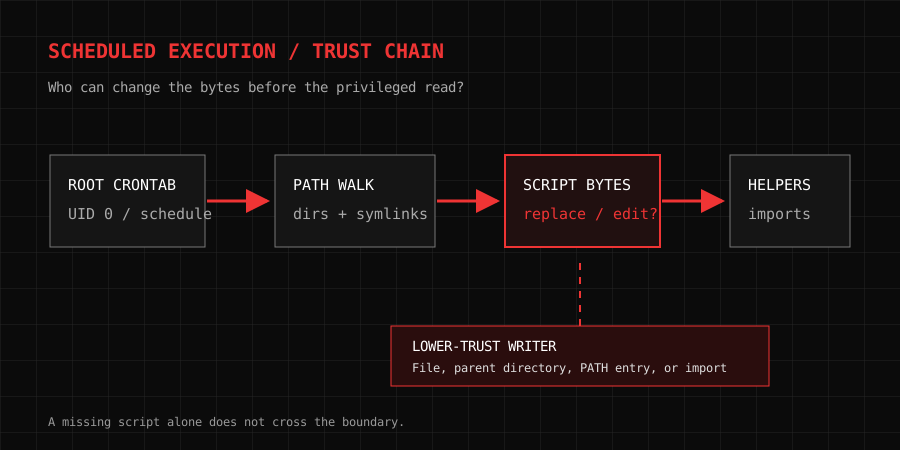
The dangerous part of a scheduled job is usually not the clock. It is the moment a privileged process decides which bytes to execute. A line in root's crontab may look stable for years while a deployment script, a parent directory, or a command found through PATH changes underneath it. If a less trusted user can influence any of those inputs, the job becomes a way to cross a privilege boundary on the next tick.
This is a guide to reasoning about and auditing that boundary. The examples use a fictional maintenance job and harmless marker files. Do not run tests against a system you do not administer or have permission to assess.
What cron actually launches
A user crontab has five time fields followed by a command. A system crontab such as /etc/crontab adds a user field before the command. That distinction matters during an audit: the username in a system crontab and the owner of a per-user crontab determine the execution identity. Do not infer privilege from the filename of a script alone.
In common cron implementations, the command field is passed to /bin/sh unless SHELL is set in the crontab. HOME, LOGNAME, and other environment values may also be set by the daemon. The command stops at an unescaped %, whose remainder becomes standard input. These details are specified in the crontab(5) manual, and they explain why copying a line into an interactive Bash session is not a faithful test. Cron's environment, shell, current directory, and time are different.
Consider a system crontab entry:
SHELL=/bin/sh
PATH=/usr/sbin:/usr/bin:/sbin:/bin
17 * * * * root /usr/local/libexec/backup-snapshot
The useful questions are precise. Does /usr/local/libexec/backup-snapshot exist at execution time? Who owns the file and every directory above it? Can a less privileged account replace the file, write to it, or change a link in its path? What does the script subsequently execute? Where does it read configuration, plugins, archives, and temporary files? The first line may be perfectly owned while a helper it invokes is not.
The trust chain, one component at a time
For an absolute path such as /usr/local/libexec/backup-snapshot, the kernel resolves /, usr, local, libexec, then the final file. Directory write and execute permission can allow an actor to add, remove, or rename entries within a directory, subject to ownership, sticky bits, ACLs, and other policy. A root-owned file inside a writable parent is not necessarily safe: a user who can replace the directory entry can present different bytes to the privileged caller. Conversely, a missing script in a root-owned, non-writable directory is usually an availability problem, not automatically a privilege-escalation path.
The simplest audit uses namei -l on the entire target, followed by stat and ACL inspection where the ownership chain is surprising:
namei -l /usr/local/libexec/backup-snapshot
stat -c '%A %U:%G %n' /usr/local/libexec/backup-snapshot
getfacl -p /usr/local/libexec/backup-snapshot
namei exposes each path component and symbolic link; the namei(1) manual documents its long display. stat on the final file is insufficient because it hides the permissions of the parents. Also check mount points, ACLs, group membership, and whether a deployment process changes ownership after your inspection. Access is determined at the time of the next execution, not at the time of your screenshot.
Symlinks need separate treatment. A link can be owned by root while its destination is writable, or a trusted directory can contain a link whose target is moved by another process. The security property is about the resolved object and its path, not just the textual name in the crontab. On Linux, tools such as namei, readlink -f, and stat help explain a current path, but a check-then-run sequence can still race with a later rename. When software must open untrusted paths securely, descriptor-relative APIs and constraints such as those described in openat2(2) are relevant. A cron entry itself does not gain those protections by using an absolute string.
Trace the boundary
Change the fictional job conditions. The exercise shows which preconditions matter; it does not test your machine.
Four common ways a job inherits untrusted code
1. The final script is writable
If root executes a script that an ordinary account can edit, the account can change what root will run. It does not matter that the crontab is root-owned. The control point is the script's content. Group write access deserves the same scrutiny as world write access: the relevant question is whether the lower-trust account belongs to the group, including through a supplementary group or ACL.
Do not rely on a permission mnemonic such as “use chmod 700” without checking the deployment model. 0750 can be reasonable when a trusted administrative group must read or execute the file; 0700 may be suitable for a private script. The owner, group, ACL, and parent directories matter more than the three digits in isolation.
2. A writable parent lets someone replace the name
A root-owned script may sit in a directory where a non-root deployment account can rename or replace files. This is a different failure from editing the script's bytes. The replacement can occur between an audit and the next hourly run. The file's inode, owner, and hash at noon do not prove what cron will resolve at 13:17.
This is why “the script is owned by root” is an incomplete finding. Write down who can modify each namespace component and who can run the deployment system that publishes into that directory. A release workflow that grants a broad team write access to the executable directory has delegated influence over the privileged job, even if nobody edits the crontab.
3. A bare command is found through PATH
Suppose the root script runs tar, rsync, or a custom rotate-archive by name rather than by a known absolute path. The shell searches PATH in order. If an earlier directory can be written by a lower-trust user, an unexpected executable can be selected. MITRE describes this class as an uncontrolled search path element, CWE-427.
This is not fixed merely by setting PATH to a string that looks familiar. Inspect every element of that string and its parent directories. A relative path, an empty component interpreted as the current directory, or a writable custom bin directory can reintroduce the problem. Using absolute paths for external commands makes the intended executable easier to review; it still leaves its own file and dependency chain to audit.
4. The script loads a second-stage input
Privileged automation often reads a config file, sources a shell fragment, imports a Python module, loads plugins, or executes files in a directory. A root-owned launcher may therefore be only the first edge in the graph. For example, a shell script that executes . /srv/backup/env.sh is granting that sourced file full influence over the running shell. A Python job with an attacker-writable module directory has a similar problem at import time. Archives and filenames can also become shell input when a script constructs commands carelessly.
An audit should follow the entire read/execute graph until every executable and interpreted input has an owner and a reason to be trusted. Data files matter when the parser treats their contents as code, paths, or commands. A text file is not safe simply because it lacks an executable bit.
Why a missing file is not automatically exploitable
The old “deleted script still scheduled” story is real only with the right path-control conditions. If cron points to /opt/private/retired.sh and /opt/private is root-owned with no untrusted write path, a regular user cannot place a replacement there. Cron will log an error or mail output, depending on configuration. If the parent is writable by a deployment account, that account may be able to supply a new file. If the job invokes a bare command, the search path creates a different opportunity.
The useful claim is therefore conditional: a privileged job executes an object that a lower-trust actor can influence. “Missing script” is one observation; “writable path” supplies the trust-boundary crossing. Without both, calling it a privilege escalation is overstated.
A careful audit workflow
Start with inventory, not payloads. Record all scheduling surfaces relevant to the host: per-user crontabs, /etc/crontab, /etc/cron.d, package-managed cron files, and systemd timers. The exact directories and spool layout vary by distribution and cron implementation. For each job, capture the schedule, execution user, full command, environment assignments, and source of the file. An owner may have migrated a task to a timer while an old cron entry remains.
Next, resolve dependencies. Expand the script's shebang and every external command, sourced file, module path, configuration file, working directory, and output location. Draw a simple chain: scheduler → shell → executable → imports and helpers → writable data. Mark each edge with the identity that reads or executes it. This is more useful than a flat list of suspicious mode bits.
Then test permissions without changing production state. namei -l, stat, getfacl, package ownership tools, and configuration review tell you who can write. If you need to validate a behavior, use a dedicated test host or a harmless non-privileged job that writes a marker file. Do not replace a production root script to “prove” a point; that can break backups or create a security incident of its own.
Finally, inspect logs and operational expectations. A scheduler that should run hourly but has been failing for weeks is a reliability finding even if nobody can replace its path. A job that succeeds but loads a writable helper is a security finding even if no suspicious execution is visible. Keep those conclusions separate.
Design the job so the boundary is narrow
The strongest correction is often to stop running the whole workflow as root. If a backup process only needs read access to a source directory and write access to a destination, assign a service identity with those rights. Where root is unavoidable for one step, split the work so the privileged component is small, fixed, and does not parse attacker-controlled scripts or shell fragments.
Place executable code in a directory managed by root or a tightly controlled deployment identity. Make ownership and modes explicit in the deployment artifact. Treat changes to that code as privileged changes with review and an audit trail. Keep mutable data, logs, and temporary files in separate directories; do not make the code directory writable just because the program needs somewhere to write output.
For shell jobs, set a deliberate SHELL, PATH, and umask; use absolute paths where practical; quote expansions; and reject unexpected filenames rather than building command strings. Avoid eval, unsanitized sh -c, and untrusted source files. These are ordinary shell hygiene rules, but a root scheduler magnifies their consequences.
On systems using systemd, a timer plus a service unit can make the execution identity and filesystem constraints visible in one place. User=, Group=, ProtectSystem=strict, ReadWritePaths=, NoNewPrivileges=, and capability restrictions may reduce what the process can touch. The systemd.exec(5) documentation explains the behavior and caveats. None of these settings repairs a writable executable; they limit damage if another part of the design fails. Verify the service actually works under the restrictions and remember that kernel or container support can change which sandboxing controls are effective.
A review checklist worth keeping
| Question | Evidence to collect | What a bad answer means |
|---|---|---|
| Who runs the job? | Crontab owner or system-crontab user field | The blast radius may be larger than expected |
| What shell and environment apply? | SHELL, PATH, HOME, umask |
Interactive tests may give false confidence |
| Who controls the executable path? | namei -l, ACLs, release process |
A trusted name can resolve to untrusted bytes |
| What does the script load? | Imports, sourced files, plugins, config | The real code boundary may be one step later |
| Where can it write? | Output paths, temp directories, mount rules | Logs or artifacts may overwrite sensitive state |
| How is it monitored? | Exit status, logs, alerting, expected outputs | A broken or changed job can persist unnoticed |
Cron did not create the privilege escalation; it made the boundary repeatable. The decisive fact is whether a less trusted actor can control something a more privileged job will execute or interpret. Once that is stated plainly, the audit becomes a path and identity problem, and the fix becomes a matter of reducing that control.